How to Build Your Own Video Platform in 2026
So You Want Your Own Video Platform
Maybe you're a SaaS founder who needs video baked into your product. Maybe you're a CTO tired of paying Zoom $3,000/month. Maybe you're an entrepreneur who sees an opportunity to build a niche video product for a specific industry.
Whatever the reason, you're thinking about building your own video conferencing platform. Good. It's more achievable in 2026 than ever before. But "achievable" doesn't mean "simple," and the path you choose matters enormously.
There are four realistic approaches. We're going to walk through each one — the real costs, the real timelines, and the real headaches — so you can make an informed decision.
Option 1: Build from Scratch with WebRTC
What This Means
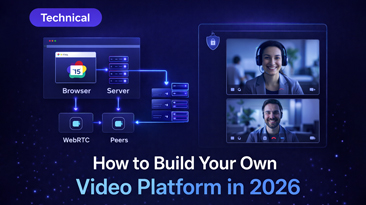
You write the entire video platform yourself, using WebRTC as the underlying real-time communication layer. WebRTC is a free, open standard supported by every modern browser. It handles the actual peer-to-peer audio and video transmission.
But WebRTC is just the transport layer. Building a video platform on WebRTC is like building a car because you have access to rubber and steel. You need:
A Selective Forwarding Unit (SFU): For calls with more than 4-5 people, peer-to-peer doesn't scale. You need a server that receives each participant's video stream and forwards it to every other participant. Popular options: mediasoup, Pion (Go), Janus, or you write your own in C++ if you hate sleep.
A signaling server: WebRTC needs a way for peers to find each other and negotiate connections. This is your signaling server — typically a WebSocket server that handles room management, participant state, and SDP (Session Description Protocol) exchange.
TURN/STUN servers: When participants are behind firewalls or strict NATs (which is most people), you need relay servers. TURN servers relay media traffic. They're essential and they consume bandwidth.
A frontend application: The actual UI that participants see and interact with. Video tiles, controls, screen sharing UI, chat, participant lists, settings panels. This is thousands of lines of JavaScript/TypeScript and a significant amount of UX work.
A backend API: Authentication, room creation, permission management, user accounts, admin controls, analytics, and billing (if applicable).
Recording infrastructure: Server-side recording requires compositing multiple video streams. This is computationally expensive and architecturally complex. You're essentially running headless browsers or custom compositor processes.
Scaling infrastructure: Load balancing across multiple SFU instances, geographic distribution, cascading bridges for large calls, horizontal scaling strategies.
Realistic Costs
| Component | Estimated Cost |
|---|---|
| SFU development / integration | $30,000 - $80,000 |
| Signaling server | $15,000 - $30,000 |
| Frontend application | $60,000 - $150,000 |
| Backend API | $40,000 - $80,000 |
| Recording pipeline | $25,000 - $60,000 |
| TURN server infrastructure | $5,000 - $15,000/year |
| Testing, security audit, polish | $20,000 - $50,000 |
| Total initial build | $195,000 - $465,000 |
| Ongoing maintenance (2-4 engineers) | $200,000 - $500,000/year |
Timeline
Minimum viable product: 6-9 months with a team of 3-4 experienced WebRTC developers. And "experienced WebRTC developer" is one of the rarest skill sets in tech. Finding them is hard. Paying them is expensive. A senior WebRTC engineer commands $180,000-$250,000/year.
Production-ready product: 12-18 months. The gap between "it works in a demo" and "it works reliably for 1,000 concurrent users across different networks, browsers, and devices" is enormous.
When This Makes Sense
Almost never, unless video IS your entire product and you need fundamental protocol-level control. If you're building the next Zoom or a specialized video platform with features that literally can't be implemented any other way, then yes, build from scratch. Otherwise, you're reinventing a very complex wheel.
Biggest Risk
WebRTC is deceptively simple for a basic 1-on-1 call. The complexity explodes with scale. NAT traversal edge cases, codec negotiation failures, bandwidth estimation, packet loss handling, echo cancellation across hundreds of device models — these are the problems that will consume your engineering team for years.
Option 2: Use a Video API (Twilio, Daily.co, Vonage, Agora)
What This Means
Instead of building the video engine yourself, you pay a provider for the infrastructure layer and build the user experience on top. They handle the SFUs, TURN servers, scaling, and media processing. You build the frontend, backend, and everything users see.
Think of it as buying the engine and transmission, then building the rest of the car.
Popular Providers in 2026
Twilio Video: $0.004/participant-minute for small groups, $0.01 for large groups. Mature API, good documentation, reliable infrastructure.
Daily.co: $0.08/participant-minute for their managed service. Simpler API than Twilio, faster to integrate, but more expensive at scale.
Agora: $0.0099/participant-minute. Strong in Asia-Pacific. SDK-heavy approach with lots of pre-built UI components.
Vonage (formerly TokBox): $0.00395/participant-minute. Solid enterprise option with good recording features.
Realistic Costs
| Component | Estimated Cost |
|---|---|
| Frontend development | $40,000 - $100,000 |
| Backend API | $25,000 - $60,000 |
| API provider fees (first year, moderate usage) | $12,000 - $60,000 |
| Integration and testing | $10,000 - $25,000 |
| Total Year 1 | $87,000 - $245,000 |
| Ongoing API fees | $12,000 - $60,000/year |
| Ongoing development | $80,000 - $200,000/year |
The API fees deserve special attention. Let's do some real math:
A 100-person company with an average of 30 concurrent users in meetings for 6 hours/day, 22 working days/month:
- 30 users x 360 minutes x 22 days = 237,600 participant-minutes/month
- At $0.004/min (Twilio): $950/month or $11,400/year
- At $0.01/min (Twilio large groups): $2,376/month or $28,512/year
For a customer-facing product with hundreds or thousands of users, these numbers can reach six figures annually.
Timeline
MVP: 2-4 months. The API handles the hard parts, so you're mostly building UI and business logic.
Production-ready: 4-8 months. You still need to handle edge cases, error states, and build a polished user experience.
When This Makes Sense
You need video as a feature in a larger product, you have unique UX requirements that pre-built solutions can't satisfy, and you have engineering resources to build and maintain a custom frontend. The video API approach is ideal when your differentiation is in the user experience around video, not in the video technology itself.
Biggest Risk
Per-minute pricing can become your largest infrastructure cost as you scale. You're also still dependent on a vendor — if Twilio changes their pricing, deprecates an API, or has an outage, you're affected. And you're building a significant amount of custom software that you'll need to maintain indefinitely.
Option 3: Fork and Customize Jitsi
What This Means
Jitsi Meet is a complete, open-source video conferencing platform. You fork the codebase (frontend + backend + media server), customize it for your needs, deploy it on your infrastructure, and maintain your fork going forward.
This gives you a running start — you're starting with a working product instead of building from zero. But "forking" and "customizing" are very different from "deploying Jitsi as-is."
What You Get Out of the Box
Jitsi Meet includes: video conferencing for up to 75-100 participants (per server), screen sharing, chat, recording (via Jibri), basic UI, lobby/waiting room, password protection, moderator controls, and phone dial-in (via Jigasi). It's Apache 2.0 licensed, meaning you can modify and commercially use it without restrictions.
What You Need to Build
The gap between "Jitsi out of the box" and "a product customers will pay for" is substantial:
Custom branding: Jitsi's UI is functional but generic. Comprehensive rebranding means modifying React components, replacing assets, changing the color scheme, updating all strings, and likely redesigning several screens.
Admin dashboard: Jitsi has no admin panel. You need to build user management, room management, analytics, settings, and configuration UI from scratch.
AI features: Transcription, meeting summaries, speaker identification — none of this exists in base Jitsi. Integrating Whisper or another speech-to-text service, building the processing pipeline, and creating the UI for it is a significant project.
Production hardening: Jitsi defaults are designed for ease of setup, not production security. SSL configuration, authentication integration, OWASP hardening, rate limiting, monitoring, logging, and alerting all need attention.
Scalability: Single-server Jitsi tops out at around 100 concurrent participants. For larger deployments, you need Octer (Jitsi's cascading bridge system), load balancing, and geographic distribution.
Realistic Costs
| Component | Estimated Cost |
|---|---|
| Fork, rebrand, and customize UI | $20,000 - $50,000 |
| Admin dashboard | $25,000 - $60,000 |
| AI transcription integration | $15,000 - $40,000 |
| Cloud recording setup | $10,000 - $20,000 |
| Production hardening and security | $10,000 - $25,000 |
| DevOps / deployment automation | $10,000 - $20,000 |
| Testing and QA | $10,000 - $25,000 |
| Total initial build | $100,000 - $240,000 |
| Ongoing maintenance (1-2 engineers) | $100,000 - $250,000/year |
Timeline
Basic customized deployment: 2-4 months Production-ready with custom features: 4-8 months Feature parity with commercial platforms: 8-14 months
When This Makes Sense
You have development resources (or budget to hire them), you want full ownership and control, you're comfortable maintaining a fork of an active open-source project, and your timeline allows for months of development before launch.
Biggest Risk
Fork maintenance. Jitsi releases updates regularly — security patches, bug fixes, performance improvements, and new features. Every update needs to be merged into your fork, which means resolving conflicts with your customizations. Over time, your fork drifts further from upstream, making merges increasingly painful. Some teams eventually abandon upstream merges entirely and maintain a fully independent codebase, which means you've taken on all future development yourself.
The second risk is underestimating the scope. "We'll just customize Jitsi" is a sentence that has preceded many budget overruns. The "just" is doing a lot of work in that sentence.
Option 4: Buy a White Label Platform
What This Means
You purchase a pre-built, production-ready video platform that's already been customized, polished, and packaged for white-label use. You get complete source code, professional branding, admin tools, AI features, and deployment support — without building or forking anything yourself.
This is the "I'd rather buy a turnkey restaurant than build one from an empty lot" approach.
What's Typically Included
A good white label platform includes everything from Options 1-3 already assembled and tested:
- Complete video conferencing with HD quality
- Custom branding throughout (logo, colors, domain, email templates)
- Admin dashboard with user management, analytics, and settings
- Cloud recording to your own storage
- AI transcription and meeting summaries
- Screen sharing, chat, waiting rooms, virtual backgrounds
- Phone dial-in
- SSO / SAML integration
- API for custom integrations
- Deployment automation (Docker, Kubernetes-ready)
- Documentation and support
Realistic Costs
| Component | Estimated Cost |
|---|---|
| Platform license (one-time) | $4,997 - $9,997 |
| Hosting (monthly) | $50 - $300/month |
| Custom development (optional) | $0 - $20,000 |
| Total Year 1 | $3,597 - $13,597 |
| Total 5-Year Cost | $9,997 - $27,997 |
Timeline
Deployed and running: 1-7 days Fully branded with custom domain: 1-2 weeks Integrated into existing product: 2-4 weeks
When This Makes Sense
You need a branded video platform fast. You don't have the engineering resources (or desire) to build or maintain video infrastructure. You want predictable, low costs. You're building a product where video is an important feature but not the core technology. You want to focus your team on your actual business instead of on video engine maintenance.
Biggest Risk
You're dependent on the vendor for the initial product quality and for ongoing updates. If the vendor goes out of business, you have the source code (assuming they provide it), but you'd need to take over maintenance.
The mitigation is straightforward: only buy from vendors who give you complete source code, use open standards (WebRTC, not proprietary protocols), and build on mainstream technology stacks you can hire for.
The Comparison Table
| Factor | From Scratch | Video API | Fork Jitsi | White Label |
|---|---|---|---|---|
| Initial Cost | $195K - $465K | $87K - $245K | $100K - $240K | $3K - $10K |
| Annual Ongoing | $200K - $500K | $92K - $260K | $100K - $250K | $600 - $3,600 |
| 5-Year Total | $1M - $2.5M | $455K - $1.3M | $500K - $1.2M | $6K - $28K |
| Time to Launch | 12-18 months | 4-8 months | 4-8 months | 1-2 weeks |
| Own Source Code | Yes | No | Yes | Yes (if included) |
| Customization | Unlimited | UI only | Unlimited | Extensive |
| Maintenance Burden | Very High | Medium | High | Low |
| Scaling | You build it | Handled | You manage it | You manage it |
| Vendor Dependency | None | High | Low | Low-Medium |
Which Option Is Right for You?
Choose "From Scratch" if video is your core product, you have $500K+ and 12+ months, and you need protocol-level control. Examples: building a Zoom competitor, a real-time collaboration platform with custom video rendering, a specialized broadcasting tool.
Choose "Video API" if you need highly custom video UX, you have engineering resources, and per-minute costs are acceptable for your scale. Examples: a telemedicine app with clinical workflow integration, a live shopping platform, a specialized EdTech tool with unique interaction patterns.
Choose "Fork Jitsi" if you want full ownership, have competent DevOps and frontend teams, and are comfortable with a 4-8 month timeline. Examples: a company building a long-term product around video, an organization with strict data sovereignty requirements and engineering capacity.
Choose "White Label" if you want a working product fast, you'd rather spend engineering time on your core business, and you want predictable low costs. Examples: a SaaS founder adding video to their platform, a healthcare provider launching telehealth, a consulting firm wanting branded meetings, an enterprise replacing Zoom.
For most businesses we talk to, the honest answer is Option 4. Not because it's what we sell (though WhiteLabelZoom is exactly this), but because the math rarely justifies Options 1-3 unless video is your entire business.
Building video infrastructure is fascinating engineering. It's also incredibly expensive engineering. And every dollar and month you spend on video plumbing is a dollar and month you don't spend on whatever makes your actual business valuable.
A Quick Note on "Hybrid" Approaches
Some teams try to combine approaches — using a video API for the media layer while building everything else custom, or starting with a white label platform and gradually replacing components. This can work, but it adds complexity. Have a clear plan for which components you own and which you buy, and avoid the trap of half-building everything.
Getting Started
If you've read this far, you probably already know which option resonates with your situation. Here's how to take the next step for each:
From Scratch: Hire a WebRTC consultant for a 2-week architecture assessment before writing any code. Don't start building without understanding the full scope.
Video API: Sign up for free tiers from Twilio, Daily, and Agora. Build a proof of concept with each. API ergonomics matter more than you think — choose the one your team finds easiest to work with.
Fork Jitsi: Deploy a vanilla Jitsi instance on Docker. Spend a week using it and reading the codebase. Understand what you're getting into before committing resources.
White Label: Try WhiteLabelZoom's live demo or similar products. Verify that the feature set covers your requirements, check that source code is included, and confirm the tech stack is something your team can work with.
Whatever you choose — stop paying per-user fees for commodity video technology. The tools to own your platform exist. The only question is which path gets you there.