Vendor Lock-In Is Killing Your Video Budget
You Don't Notice the Lock Until You Try to Open the Door
Vendor lock-in is one of those things nobody thinks about when they sign up for a video platform. You pick Zoom because everyone knows Zoom. You pick Teams because you already have Microsoft 365. You pick Google Meet because it's bundled with Workspace. Reasonable choices, all of them.
Then, two years later, something changes. Maybe your costs have ballooned. Maybe you need features the platform doesn't offer. Maybe a client requires on-premise hosting for compliance. And you realize: leaving is going to be expensive and painful.
That's lock-in. Not a contract you signed — a situation you drifted into.
What Vendor Lock-In Actually Looks Like
Lock-in isn't just "I can't export my data." It's a system of dependencies that make switching progressively more expensive the longer you stay. Here's how it works in video conferencing:
Data Lock-In
Your meeting recordings are stored on the vendor's cloud. Your chat transcripts, meeting analytics, and participant data live in their system. Want to leave? You can export some of it, but the format might not be compatible with anything else. Zoom's cloud recordings, for instance, can be downloaded — one by one. If you have 10,000 recordings across your organization, that's a fun weekend project.
Integration Lock-In
You've built workflows around the platform. Calendar integrations, CRM connections, automated meeting creation through their API. Your developers spent weeks building these integrations. Switching platforms means rebuilding all of them.
Workflow Lock-In
Your team has learned the tool. They know where the buttons are, how to schedule meetings, how to use breakout rooms. Retraining 500 employees isn't free — it's a real cost in productivity and frustration.
Pricing Lock-In
This is the sneaky one. Per-user pricing means your costs scale linearly with your team. You started with 10 users at $15/month each — totally manageable. Now you have 200 users, and that's $3,000/month. But switching would cost even more in the short term, so you stay. The vendor knows this.
How Zoom Keeps You Locked In
Zoom is brilliant at this. Not maliciously — it's just good business for them.
Per-user pricing that scales against you. Zoom Business is $21.99/user/month. At 50 users, that's $1,100/month. At 200 users, $4,398/month. At 500 users, $10,995/month. Your costs grow with headcount, regardless of how much you actually use the platform.
Add-ons that become necessities. You start with basic Zoom. Then you need cloud recording ($40/month). Then AI Companion ($12/user/month). Then phone dial-in ($13/user/month). Then webinars ($79/month). Each one creates another dependency.
Zoom's SDK for embedding. If you've built Zoom into your product using their SDK, you're deeply locked in. The SDK has its own licensing, usage terms, and limitations. Switching means rebuilding your entire video integration from scratch.
Annual contracts with auto-renewal. Miss the cancellation window and you're locked in for another year. This is standard for enterprise SaaS, but it's still a lock-in mechanism.
How Microsoft Teams Keeps You Locked In
Teams is arguably worse because it's bundled with Microsoft 365. You're not just locked into a video platform — you're locked into an entire productivity ecosystem.
The bundle trap. Teams comes "free" with Microsoft 365. Except you're paying $22/user/month for Business Premium, and unbundling Teams means you still pay essentially the same price for everything else. The European Commission forced Microsoft to offer Teams separately, but the pricing makes it clear: you're expected to stay in the bundle.
Active Directory integration. Your user management, permissions, and authentication all run through Azure AD. Teams is deeply wired into this. Switching video platforms means figuring out authentication all over again.
SharePoint and OneDrive dependencies. Meeting recordings go to OneDrive. Shared files go to SharePoint. Teams channels are collaboration hubs. Pull out the video piece and you disturb the entire workflow.
How Google Meet Keeps You Locked In
Google's approach is similar to Microsoft's: bundling.
Workspace bundling. Meet is part of Google Workspace. You pay $14-22/user/month for the whole suite. The video piece is "included," which makes it feel free. But you're paying for it, and leaving Workspace just for video doesn't make financial sense — so you stay in the whole ecosystem.
Google Calendar integration. Every meeting is a Google Calendar event with a Meet link auto-attached. Your entire organization's scheduling depends on this. Switching to another video platform means changing how everyone creates meetings.
Limited API and customization. Google Meet has minimal API support compared to Zoom. You can't deeply integrate it, which means you haven't built dependencies — but you also can't customize it. You're stuck with Google's feature set and timeline.
The Real Cost of Switching
Let's quantify what switching actually costs for a 200-person company:
| Switching Cost | Estimate |
|---|---|
| Data migration (recordings, transcripts) | $5,000-15,000 |
| Integration rebuilding | $10,000-30,000 |
| Employee retraining (productivity loss) | $8,000-20,000 |
| IT staff time for transition | $5,000-10,000 |
| Parallel running period (2-3 months) | $3,000-9,000 |
| Total switching cost | $31,000-84,000 |
That's the real lock-in tax. The vendor doesn't charge it directly — they just make sure leaving is expensive enough that you don't.
How Open-Source Solves Vendor Lock-In
Open-source video platforms (like Jitsi, BigBlueButton, or white-label solutions built on open standards) fundamentally change the lock-in equation:
You own your data. Recordings, transcripts, analytics — all stored on your infrastructure. Want to switch platforms? Your data is already in your hands.
Standard protocols. WebRTC is an open standard. Any WebRTC-based platform can be swapped for another without rebuilding your entire video stack. You're not dependent on a proprietary SDK.
No per-user pricing. Open-source and one-time-license models don't scale against you. Your costs are infrastructure (servers, bandwidth) not headcount. Adding 100 users doesn't increase your licensing cost by a dollar.
Full source code access. If the vendor disappears, you still have the code. If you need a custom feature, you can build it. If you want to migrate to a different hosting provider, you can. This is the ultimate anti-lock-in.
The Ownership Model
Here's what ownership looks like in practice with a solution like WhiteLabelZoom:
- One-time payment: $4,997-$9,997. No recurring fees. No per-user charges.
- Your infrastructure: Deploy on AWS, GCP, DigitalOcean, or on-premise. Switch providers anytime.
- Your data: Recordings on your S3 bucket. Analytics in your database. Nothing in a vendor's cloud you can't access.
- Your brand: Complete white-label. No vendor branding anywhere.
- Source code: Full access. Modify, extend, or fork as needed.
- Open standards: WebRTC-based. Standard APIs. No proprietary lock-in.
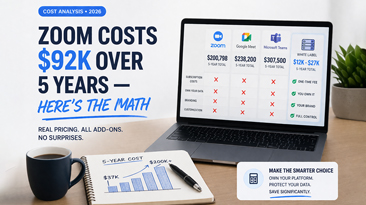
The total cost of ownership over 5 years for a 200-person organization:
| Model | Year 1 | Year 2-5 | Total 5-Year |
|---|---|---|---|
| Zoom Business | $13,200 | $52,800 | $66,000 |
| WhiteLabelZoom + Hosting | $9,997 | $7,200 | $13,197 |
| Savings | $52,803 |
And the real kicker: at the end of 5 years with Zoom, you own nothing. With WhiteLabelZoom, you own a platform, your data, your recordings, and the freedom to do whatever you want with all of it.
Breaking Free: A Practical Approach
If you're currently locked into a video platform and want out, here's the approach that works:
-
Audit your dependencies. List every integration, workflow, and data store that touches your current video platform. This is your migration scope.
-
Start with new projects. Don't migrate everything at once. Use the new platform for new teams, new clients, or new use cases. Build confidence before migrating existing workflows.
-
Run parallel for 30-60 days. Keep the old platform running while you validate the new one. This costs money but prevents disasters.
-
Migrate data systematically. Export recordings in batches. Rebuild integrations one at a time. Train teams department by department.
-
Cut over and cancel. Once everyone is on the new platform and validated, cancel the old subscription. Time this with your contract renewal to avoid paying for overlap.
The Uncomfortable Truth
Vendor lock-in in video conferencing is a choice — usually made by default rather than deliberately. The moment you sign up for a per-user SaaS platform, you're agreeing to costs that increase as you grow and switching costs that increase as you stay.
The alternative is ownership. It requires more upfront thought, a one-time investment, and the willingness to manage your own infrastructure (or pay someone a flat fee to manage it). But it gives you something no SaaS subscription ever will: freedom.
And freedom, as it turns out, is also a lot cheaper over time.