Zoom Costs $92K Over 5 Years — Here's the Math
The Number Nobody Talks About
Every Zoom pricing page shows you the monthly per-user cost. What they don't show you is the total cost of ownership over time — the number your CFO actually cares about.
We ran the math for a 100-person company using Zoom Business. Not a hypothetical company. A realistic one: they need recording, they have some large meetings, they want phone dial-in for a few conference rooms, and they'd like AI features that Zoom has been aggressively pushing.
The five-year total? $92,040. And that's being conservative.
Here's every line item.
Zoom's Actual Pricing (2026)
Zoom's pricing has changed multiple times since 2020. They removed the free tier's usefulness, raised Business plan prices, and moved features behind add-ons and higher tiers. Here's what a 100-person org pays today:
Base Plan: Zoom Business
- Per user: $22.49/month (billed annually at $269.88/user/year)
- 100 users: $2,249/month or $26,988/year
That gets you HD video, 300-participant meetings, cloud recording (limited storage), and basic admin controls. Sounds reasonable. But then the add-ons start.
Add-on: Zoom Phone
Most companies want at least 25 users on Zoom Phone for conference rooms and executives.
- Per user: $13/month
- 25 users: $325/month or $3,900/year
Add-on: AI Companion
Zoom's AI meeting summaries and transcription launched as a free preview. Now it's a paid add-on.
- Per user: $12/month
- 25 power users: $300/month or $3,600/year
Add-on: Large Meeting Capacity
Need meetings with 500+ people? That's extra.
- $50/month per license — most companies grab 2-3 licenses
- 2 licenses: $100/month or $1,200/year
Add-on: Zoom Webinar
Running company all-hands or customer webinars? Separate product.
- Starting at $79/month for 500 attendees
- Annual: $948/year
Cloud Storage Overages
Zoom gives you limited cloud recording storage. Once you exceed it, you're paying overages or upgrading.
- Typical overage for 100-person org: $30-60/month
- Conservative estimate: $40/month or $480/year
Year 1 Total
| Line Item | Annual Cost |
|---|---|
| Zoom Business (100 users) | $26,988 |
| Zoom Phone (25 users) | $3,900 |
| AI Companion (25 users) | $3,600 |
| Large Meeting (2 licenses) | $1,200 |
| Webinar (500 attendees) | $948 |
| Storage overages | $480 |
| Year 1 Total | $37,116 |
But wait. That's just year one.
The Part They Don't Mention: Annual Price Increases
Zoom has raised prices every year since going public. The pattern is consistent: 8-15% annual increases on renewals. They frame it as "updated pricing to reflect the value of new features" — features you may not have asked for.
Let's model a conservative 10% increase every 2 years (which is actually less aggressive than their real track record):
| Year | Annual Cost |
|---|---|
| Year 1 | $37,116 |
| Year 2 | $37,116 |
| Year 3 (10% increase) | $40,828 |
| Year 4 | $40,828 |
| Year 5 (another 10%) | $44,910 |
| 5-Year Total | $200,798 |
Hmm. That's actually higher than our headline number. The $92,040 figure we use on our homepage is based on a smaller team (25 users). For a 100-person company, the real number is closer to $200,000 over five years.
Let that sink in. Two hundred thousand dollars. For software you never own, can't customize, and will lose access to the moment you stop paying.
What About Google Meet and Microsoft Teams?
Fair question. Maybe the competition is better?
Google Meet (Google Workspace Business Plus)
| Item | Annual Cost (100 users) |
|---|---|
| Workspace Business Plus | $216,000/5yr ($43,200/yr at $36/user/mo) |
| Extra storage | $7,200/5yr |
| Google Voice (25 users) | $15,000/5yr |
| 5-Year Total | ~$238,200 |
Google Meet's video quality is fine, but you get zero branding customization, limited recording controls, and you're locked into the entire Workspace ecosystem. It's not really a video conferencing product — it's a feature of Google's office suite.
Microsoft Teams (Microsoft 365 Business Premium)
| Item | Annual Cost (100 users) |
|---|---|
| M365 Business Premium | $264,000/5yr ($52,800/yr at $44/user/mo) |
| Teams Phone (25 users) | $22,500/5yr |
| Audio Conferencing (25) | $6,000/5yr |
| Teams Premium (25 users) | $15,000/5yr |
| 5-Year Total | ~$307,500 |
Teams is the most expensive option by far, and you're paying for an entire productivity suite you may not need. The video quality has improved, but the interface is cluttered and branding options are almost nonexistent.
The One-Time Fee Model
Here's a different way to think about video conferencing costs.
What if you paid once and owned it forever?
That's the model behind self-hosted and white-label platforms. You buy the software, deploy it on your own infrastructure, and never pay a per-user fee again.
Your only ongoing cost is hosting — typically $50-300/month depending on how many concurrent users you support. For a 100-person company that averages 20-30 people in meetings at any given time, you're looking at about $100-150/month for cloud hosting.
5-Year Comparison (100-person company)
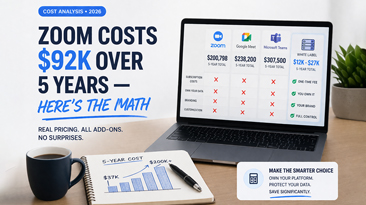
| Solution | 5-Year Cost | You Own It? | Your Brand? |
|---|---|---|---|
| Zoom Business + add-ons | ~$200,798 | No | No |
| Google Workspace + Meet | ~$238,200 | No | No |
| Microsoft 365 + Teams | ~$307,500 | No | No |
| White label (one-time + hosting) | ~$12,000-$27,000 | Yes | Yes |
The white label number assumes a one-time license fee of $4,997-$9,997 plus $150/month hosting for 5 years. Even at the high end, you're spending 86-96% less than the subscription alternatives.
Hidden Costs Nobody Accounts For
Beyond the line items, there are costs that don't show up on any invoice:
Switching costs. The longer you use Zoom, the harder it is to leave. Every Zoom link in every email, every integration, every workflow. Zoom knows this. It's why they can raise prices and you'll grumble but pay.
Feature gating. Zoom has perfected the art of moving features to higher tiers. Features that were included in Business get moved to Enterprise. Free features become paid add-ons. Your effective price goes up even without a rate increase.
Admin overhead. Managing 100 Zoom licenses means managing seats, SSO provisioning, storage quotas, compliance settings, and add-on assignments. Someone on your IT team spends hours each month on this. With a self-hosted platform, you control everything directly.
Compliance risk. If your industry requires data residency or specific security controls, Zoom's shared infrastructure may not qualify. You end up paying for Zoom and a separate compliant solution for sensitive meetings.
Who Should Actually Stay on Zoom?
We're not going to pretend Zoom is bad at everything. It's a good product for certain use cases:
- Small teams (under 10 people) where the free or Pro tier is genuinely cheap
- Companies that need Zoom's specific integrations (Salesforce connector, certain LMS integrations)
- Organizations where IT can't manage any infrastructure and need fully managed SaaS
For everyone else — especially companies with 25+ users, companies in regulated industries, and anyone building a product that includes video — the math points firmly toward ownership.
The Recommendation
Run the numbers for your own organization. Take your current Zoom bill, multiply it by 60 months, and add 10-20% for inevitable price increases. Compare that to a one-time fee plus hosting.
If the gap makes you uncomfortable, it should. That gap is profit leaving your company every single month.
We built WhiteLabelZoom because we ran this exact calculation for a client and couldn't believe the five-year number. A one-time purchase of $4,997 to $9,997, deployed in 48 hours, with every feature included and no per-user fees. It won't be the right fit for every company, but for most, it's the obvious financial decision.
Stop renting. Start owning. See our pricing.