10 Cheapest Zoom Alternatives That Actually Work | 2026 Guide
Table of Contents
- Why Cheap Does Not Mean Bad
- 10 Cheapest Zoom Alternatives Ranked by Cost
- Side-by-Side Comparison Table
- Quality vs. Cost: What the Numbers Actually Show
- You Get What You Pay For: What Free Tools Lack
- The Sweet Spot: One-Time Purchase
- Frequently Asked Questions
- The Verdict
Why Cheap Does Not Mean Bad
Zoom charges between $13.33 and $21.99 per user per month. For a 20-person company, that is $3,200 to $5,280 per year. Over three years, the total crosses $10,000 easily. For five years, you are looking at north of $16,000 --- and that assumes Zoom never raises prices, which it has.
The instinct to find a cheapest zoom alternative is not about cutting corners. It is about recognizing that the underlying technology has caught up to the pricing. WebRTC is open and free. Media servers are commoditized. Cloud compute costs a fraction of what it did in 2020. The infrastructure required to deliver a reliable video call is no longer expensive enough to justify perpetual per-user subscriptions.
What has actually changed is the market. In 2020, Zoom was one of a small number of platforms that could deliver a stable group call. In 2026, there are dozens of tools that handle video, audio, screen sharing, and recording without issue. Some are completely free. Some charge a small fee. Some let you pay once and never pay again.
The real question is not whether cheap alternatives exist --- they do. The question is which ones deliver enough quality and reliability to replace Zoom without creating new problems. This guide answers that by ranking ten alternatives from cheapest to most expensive, with honest assessments of what each one actually delivers.
10 Cheapest Zoom Alternatives Ranked by Cost
We have organized these from completely free to budget-friendly to one-time purchase. The order reflects real cost, not marketing claims.
Tier 1: Completely Free
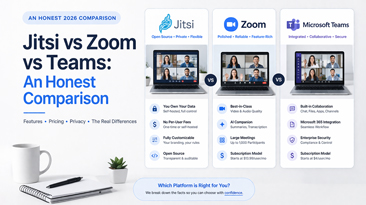
1. Jitsi Meet --- $0, Open Source
Jitsi Meet is the gold standard for free video conferencing. The public instance at meet.jit.si requires no account, no download, and no payment. You open a browser, create a room, and share the link. That is it.
Actual cost: $0 for public instance. $20--$80/month if you self-host for more control. What you get: HD video and audio, screen sharing, chat, end-to-end encryption, no time limits, no account required. Limitations: No recording on the public instance. No branding. No admin dashboard. Quality degrades above 35--50 participants on the free server. Self-hosting requires Linux administration skills.
Jitsi is the first tool we recommend to anyone whose primary concern is cost. It works, it is private, and it genuinely costs nothing. The ceiling shows when you need recording, branding, or large meetings.
2. Google Meet (Free Tier) --- $0, Google Account Required
Google Meet gives you video calls through a browser with nothing to install. If you have a Gmail address, you already have access.
Actual cost: $0 (Google Workspace plans start at $7/user/month if you need more). What you get: 100 participants, screen sharing, real-time captions, noise cancellation, chat. Limitations: 60-minute cap on group calls. No recording. No breakout rooms. No custom branding. All data runs through Google's infrastructure.
The 60-minute limit is the hard constraint. If your meetings regularly run under an hour, Google Meet's free tier is a perfectly functional Zoom replacement. If they do not, you will hit a wall every single call.
3. Skype --- $0, Legacy but Functional
Skype has been free for over two decades. Microsoft keeps it running alongside Teams, and for basic calls it remains surprisingly capable.
Actual cost: $0. What you get: 100 participants, 24-hour call duration (effectively unlimited), screen sharing, chat, file sharing, call recording, real-time translation. Limitations: Uncertain product roadmap. Microsoft prioritizes Teams. No branding, no admin controls, no API. The interface feels dated compared to modern tools.
Skype offers more features in its free tier than most competitors --- recording and near-unlimited duration are genuine advantages. The risk is building workflows around a platform that Microsoft has consistently deprioritized.
4. FaceTime --- $0, Apple Ecosystem
FaceTime is free on every Apple device. Since 2021, non-Apple users can join via browser link, though with reduced functionality.
Actual cost: $0 (requires Apple hardware for the best experience). What you get: Unlimited call duration, spatial audio, portrait mode, SharePlay, screen sharing on Apple devices. Limitations: 32-participant cap. No recording. No breakout rooms. No branding. Non-Apple participants get a degraded experience. Not viable for mixed-device teams.
FaceTime is excellent for what it is --- a consumer calling tool for Apple users. It is not a business platform, and trying to use it as one will frustrate anyone on Windows or Android.
5. BigBlueButton --- $0, Open Source for Education
BigBlueButton was built for online learning and it shows. Shared whiteboard, breakout rooms, polling, and LMS integration come standard --- features that Zoom charges extra for.
Actual cost: $0 for the software. $40--$120/month for a server capable of handling 50--150 users. What you get: Whiteboard, breakout rooms, polling, shared notes, recording, closed captions, Moodle/Canvas integration. Limitations: Self-hosted only. Specific server requirements (Ubuntu 20.04/22.04, dedicated hardware recommended). Installation is complex. Not designed for general business use.
If you are in education or training and have server administration capability, BigBlueButton is arguably the best free option available. For general business use, the setup effort outweighs the savings for most teams.
Tier 2: Budget-Friendly Paid Options
6. Whereby (Free Tier + Paid Plans) --- $0 to $8.99/month
Whereby keeps things simple. One permanent meeting link, browser-based, no downloads. The free tier works for one-on-one calls. The paid tiers add features without the complexity.
Actual cost: Free tier for 1 room and 100 participants. Pro at $8.99/month for 3 rooms and more features. Business tier available. What you get (paid): Multiple rooms, recording, custom branding (Business tier), breakout groups, integrations. Limitations: Free tier has a 45-minute cap on group calls. No API access on lower tiers. Branding requires the Business plan at a higher price. Still a recurring subscription.
Whereby's paid plans are cheaper than Zoom, but they are still subscriptions. The simplicity is appealing, but you trade flexibility for convenience.
7. Zoho Meeting --- $1 to $3/host/month
Zoho Meeting is part of the larger Zoho ecosystem. If you already use Zoho CRM, Zoho Mail, or other Zoho products, the integration is seamless and the price is hard to beat.
Actual cost: Free for up to 100 participants (60-minute limit). Paid plans from $1/host/month (billed annually) for meetings, $3/host/month for webinars. What you get: HD video, screen sharing, recording, polls, Q&A, virtual backgrounds, Zoho ecosystem integration. Limitations: Feature set is solid but not extensive. Interface is functional rather than polished. Best value only if you are already in the Zoho ecosystem. Annual billing required for lowest prices.
Zoho Meeting is genuinely one of the cheapest paid options on the market. The catch is that the low price assumes annual billing and works best within the Zoho suite. As a standalone tool, it is capable but unremarkable.
8. Livestorm --- $79/month (Starter)
Livestorm positions itself as a video engagement platform rather than a simple meeting tool. The pricing is higher than pure meeting software, but it includes webinar features, registration pages, and analytics.
Actual cost: Free for up to 30 contacts per event. Starter at $79/month for 100 contacts. Pro pricing is custom. What you get: Webinars, automated events, registration pages, analytics, integrations with CRM and marketing tools, recording, screen sharing. Limitations: The free plan is very limited (30 contacts, 20 minutes). Starter pricing is per-workspace, not per-user, which helps larger teams. Still a monthly subscription.
Livestorm is not the cheapest option by unit price, but the per-workspace model means it can be more affordable than Zoom for teams with 10+ users who also need webinar capabilities.
Tier 3: One-Time Purchase
9. WhiteLabelZoom --- $499 One-Time
WhiteLabelZoom is a complete video conferencing platform sold as a one-time purchase. You pay once, get the source code, deploy it on your infrastructure, and never pay a license fee again.
Actual cost: Starting at $499, paid once. Hosting costs of $20--$100/month depending on scale. What you get: HD video and audio, screen sharing, recording, breakout rooms, waiting rooms, virtual backgrounds, custom branding, chat, file sharing, webinar mode, API access, full source code. Limitations: Requires your own hosting. Initial setup takes a few hours. You are responsible for maintenance and updates (though the codebase is designed for easy deployment).
The math on WhiteLabelZoom is straightforward. Zoom Pro for 10 users costs roughly $1,600/year. WhiteLabelZoom costs $499 once plus hosting. By month four, you have broken even. Every month after that is pure savings. Over three years, the difference for a 10-person team exceeds $4,000.
10. MirrorFly --- $999+ One-Time (SDK)
MirrorFly sells communication SDKs rather than a ready-to-use platform. You get video, audio, and chat APIs to build into your own application. The one-time license starts at $999 for the self-hosted option.
Actual cost: $999+ one-time for self-hosted SDK. Cloud plans also available with usage-based pricing. What you get: Video and audio SDKs, chat API, push notifications, SIP/VoIP support, 1,000+ participant capacity. Limitations: This is an SDK, not a finished product. You need developers to integrate it into your application. The base price gets you the SDK; building a complete platform on top of it requires significant development time and cost.
MirrorFly makes sense for companies building a product that includes video --- a telehealth app, an EdTech platform, a marketplace with live selling. For teams that just need to hold meetings, it is overkill and ultimately more expensive once you factor in development.
Side-by-Side Comparison Table
| Platform | Upfront Cost | Monthly Cost | Max Participants | Time Limit | Recording | Branding | Source Code |
|---|---|---|---|---|---|---|---|
| Jitsi Meet | $0 | $0 (public) | ~75 | None | Self-host only | Self-host only | Yes |
| Google Meet Free | $0 | $0 | 100 | 60 min | No | No | No |
| Skype | $0 | $0 | 100 | 24 hrs | Yes | No | No |
| FaceTime | $0 | $0 | 32 | None | No | No | No |
| BigBlueButton | $0 | $40--$120 (hosting) | 150 | None | Yes | Self-host only | Yes |
| Whereby Free | $0 | $0 | 100 | 45 min | No | No | No |
| Zoho Meeting | $0 | $1--$3/host | 250 | None (paid) | Yes (paid) | No | No |
| Livestorm | $0 | $79/workspace | 100+ | None (paid) | Yes | Limited | No |
| WhiteLabelZoom | $499 | $20--$100 (hosting) | 500 | None | Yes | Full | Yes |
| MirrorFly | $999+ | $20--$100 (hosting) | 1,000+ | None | Yes | Full | Yes |
Quality vs. Cost: What the Numbers Actually Show
There is a predictable relationship between cost and capability in video conferencing, but it is not linear. Here is what the data shows when you map features against price.
Free tools ($0) give you the basics: video calls, screen sharing, and chat. The average free tool offers 5--7 core features out of a possible 15+ that a full platform delivers. That covers roughly 60% of what most teams need for day-to-day meetings.
Budget subscriptions ($1--$10/month) add recording, longer durations, and sometimes polling or basic integrations. You gain 2--4 additional features for $12--$120 per year. The per-feature cost is reasonable, but these are still subscriptions that compound over time.
One-time purchase ($499--$999) delivers 90--100% of the feature set: recording, branding, breakout rooms, webinars, API access, and source code ownership. The upfront cost is higher, but the three-year total is dramatically lower than any subscription that offers comparable features.
The breakeven calculation between a $499 one-time purchase and a $13/user/month subscription happens faster than most people expect:
- Solo user: Breakeven at ~38 months (just over 3 years).
- 5-person team: Breakeven at ~8 months.
- 10-person team: Breakeven at ~4 months.
- 25-person team: Breakeven at ~6 weeks.
The larger the team, the faster a one-time purchase pays for itself. For any team above five people, the subscription model becomes the more expensive choice within the first year.
You Get What You Pay For: What Free Tools Lack
Free video conferencing tools are genuinely useful, but they are not complete replacements for a paid platform. Here is what they consistently leave out.
Recording
Only Skype and self-hosted open-source tools offer recording at no cost. Google Meet, Whereby, and FaceTime do not record on their free tiers. If your workflow requires meeting recordings --- for training, compliance, or async review --- free tools create a gap.
Custom Branding
No free tool lets you brand the meeting experience. Your logo, your colors, your domain --- none of that is available without paying. For agencies, consultants, and client-facing businesses, this matters. Showing a Jitsi or Google Meet URL instead of your own brand erodes the professional experience.
Admin Controls
User management, meeting analytics, waiting rooms, access controls --- these require a paid tier on every platform. Free tools give participants equal access, which is fine for casual calls and problematic for structured business meetings.
Breakout Rooms
Breakout rooms are a standard feature in Zoom's paid plans and a critical tool for workshops, training sessions, and collaborative meetings. Among free tools, only BigBlueButton (self-hosted) offers them. Every other free option lacks this capability entirely.
API and Integration Access
If you need to embed video into your product, trigger meetings programmatically, or integrate with your CRM, free tiers do not provide API access. This is universally a paid feature.
Reliability and Support
Free tools do not come with SLAs or dedicated support. When the public Jitsi instance has a bad day, your meeting quality drops and there is no one to call. When Google Meet changes its free tier limits --- which it has done multiple times --- you adjust or upgrade.
The pattern is clear: free tools cover the basics for small, informal use. The moment your requirements include recording, branding, large meetings, or integrations, you are looking at a paid solution. The question becomes whether you pay monthly or once.
The Sweet Spot: One-Time Purchase
The one-time purchase model sits at the intersection of affordability and capability. You pay more upfront than a free tool but less over time than any subscription, and you get a feature set that matches or exceeds what Zoom offers at its Pro or Business tiers.
Here is why the model works in 2026:
Infrastructure is cheap. A VPS capable of hosting 50 concurrent video users costs $40--$60 per month. That is your only recurring cost, and it scales down when you need less capacity.
WebRTC is mature. The core protocol powering browser-based video is stable, well-documented, and universally supported. You do not need proprietary technology to deliver a reliable video call anymore.
Source code ownership eliminates vendor risk. When you own the code, no vendor can raise your prices, discontinue your plan, or change terms of service. The platform works as long as you want it to.
WhiteLabelZoom represents this model at its most practical. At $499, you get a production-ready platform with the feature depth of Zoom Pro --- recording, breakout rooms, webinars, custom branding, API access --- without the $13/user/month invoice. For a 10-person team over three years, the total cost of ownership (purchase plus hosting) comes to roughly $2,660. The same team on Zoom Pro would spend approximately $4,800. That is a $2,140 difference, and the gap widens every year you continue using the platform.
The sweet spot is not about being the cheapest option on day one. It is about being the cheapest option over the lifecycle of your business, while still delivering everything you need.
Frequently Asked Questions
What is the cheapest zoom alternative that includes recording?
Skype offers free recording with no time limit. For a more professional solution with full admin controls and branding, WhiteLabelZoom at $499 one-time includes cloud and local recording without per-user fees.
Are free zoom alternatives safe to use?
Most are safe for general use. Jitsi Meet offers end-to-end encryption. Google Meet encrypts data in transit. The primary concern with free tools is data privacy --- your meeting data may be stored on the provider's servers and subject to their privacy policy. Self-hosted options give you full control over data.
Can free alternatives handle large meetings (100+ participants)?
Google Meet Free and Skype support up to 100 participants. BigBlueButton (self-hosted) handles up to 150. For 200+ participants, you need either a paid subscription or a one-time purchase platform like WhiteLabelZoom, which supports up to 500.
Is there a cheapest zoom alternative with breakout rooms?
BigBlueButton (free, self-hosted) includes breakout rooms. Among paid options, WhiteLabelZoom ($499 one-time) offers breakout rooms without ongoing fees. Zoom itself requires a Pro plan ($13.33/user/month) for breakout room access.
What is the cheapest option for a small team of 5--10 people?
For pure cost savings, Jitsi Meet at $0 is unbeatable if you can work without recording and branding. If you need full features, WhiteLabelZoom at $499 breaks even against Zoom Pro within four to eight months for a team of that size.
Do cheap zoom alternatives work for webinars?
Free tools do not include webinar functionality. Livestorm starts at $79/month for webinar features. WhiteLabelZoom includes webinar mode in its $499 one-time purchase. Zoom charges $79/month as an add-on for webinars.
Can I use a cheap zoom alternative for HIPAA-compliant meetings?
Free consumer tools (Google Meet Free, Skype, FaceTime) are not HIPAA compliant. Self-hosted options like Jitsi and BigBlueButton can be configured for compliance if deployed correctly. WhiteLabelZoom supports HIPAA-compliant deployment since you control the infrastructure and data.
How much does hosting cost for self-hosted alternatives?
A basic VPS for 10--30 concurrent users costs $20--$40/month. A server for 50--100 concurrent users runs $40--$80/month. High-capacity setups for 200+ users may require $100--$200/month. These costs apply to Jitsi, BigBlueButton, WhiteLabelZoom, and any other self-hosted platform.
The Verdict
The cheapest zoom alternative depends entirely on what you need and how long you plan to use it.
If you just need basic video calls and cost is the only factor: Jitsi Meet at $0 is the answer. No account, no download, no catch. It works for casual meetings and small teams that do not need recording or branding.
If you want a familiar free experience with minimal setup: Google Meet's free tier handles short meetings well. The 60-minute limit is the only real barrier.
If you need full features at the lowest possible long-term cost: WhiteLabelZoom at $499 one-time is the clear winner. It delivers every feature Zoom Pro offers --- recording, breakout rooms, webinars, custom branding, API access --- without locking you into a subscription. For teams of five or more, it becomes the cheapest option within the first year and only gets cheaper from there.
The market has moved past the point where expensive means better. In 2026, the smartest move is to match the tool to the need. For most teams and businesses, that means either starting free and upgrading when you hit limits, or paying once for a platform that has no limits to hit.