Jitsi vs Zoom vs Teams: An Honest 2026 Comparison
Why This Comparison Exists
Most "Jitsi vs Zoom" articles are written by companies selling one of them. You get Zoom's marketing copy disguised as a comparison, or an open-source evangelist who acts like Jitsi has zero drawbacks.
We're going to be honest. We use Jitsi-based technology in our own product, so you should know our bias upfront. But we also genuinely believe in giving you accurate information, because choosing the wrong platform costs you real money and real headaches.
Here's where each platform stands in 2026.
Feature Comparison
Video and Audio Quality
Zoom still has the best adaptive bitrate handling in the industry. Their network optimization is excellent — Zoom calls feel smooth even on mediocre connections. They've invested billions in their global data center network and it shows. Credit where it's due: Zoom's call quality is their strongest feature.
Microsoft Teams has improved significantly since its rocky start. Video quality is solid on good connections, but it degrades faster than Zoom on poor ones. Audio quality is excellent, partly because of Microsoft's legacy in Skype technology. The interface, however, uses more bandwidth than it needs to — Teams is a resource hog.
Jitsi uses WebRTC natively, which means quality depends heavily on your server configuration and deployment. A well-configured Jitsi instance with a good media server (Jitsi Videobridge 2) handles 75-100 participants with solid quality. Out of the box, it won't match Zoom's network optimization. With tuning, it gets close.
Winner: Zoom for raw call quality. Jitsi is close second when properly configured. Teams is acceptable.
Screen Sharing and Collaboration
Zoom offers full-screen and window-specific sharing, annotation tools, remote control, and whiteboard. The whiteboard has gotten genuinely useful in 2026 — collaborative drawing, sticky notes, and templates.
Teams integrates screen sharing with its collaboration features. You can co-edit Office documents during a call, which is a genuine workflow advantage if your organization runs on Microsoft 365. The screen sharing itself is functional but occasionally laggy.
Jitsi handles screen sharing well — full screen, window, and tab sharing via WebRTC's getDisplayMedia API. No built-in annotation or whiteboard in base Jitsi, though plugins exist. It's the simplest implementation but covers the core use case.
Winner: Teams if you use Microsoft 365 daily. Zoom for general-purpose sharing. Jitsi is functional.
Recording
Zoom records to their cloud (with storage limits and overages) or locally. Cloud recordings are processed for transcription and AI features. Quality is excellent.
Teams records to OneDrive or SharePoint. Processing can be slow — sometimes recordings take 30-60 minutes to become available. Quality is good. Storage counts against your OneDrive quota.
Jitsi can record via Jibri (a server-side recording component) to any storage you choose — local disk, S3, your own cloud. Setup requires additional server configuration, and Jibri is resource-intensive (it renders the meeting view in a headless browser). But you own every recording, no storage limits, no overages.
Winner: Depends on your priority. Zoom for easiest setup. Jitsi for ownership and no per-recording costs. Teams for Microsoft ecosystem integration.
Chat and Messaging
Zoom has in-meeting chat and Zoom Team Chat (their Slack competitor). The in-meeting chat is basic. Team Chat is functional but few organizations use it as their primary messaging tool.
Teams is built around persistent chat. Channels, threads, file sharing, app integrations — this is where Teams genuinely shines. If your company already communicates through Teams, having video integrated into the same interface is a real advantage.
Jitsi has basic in-meeting chat. No persistent messaging. It's designed as a meeting tool, not a communication platform.
Winner: Teams by a mile for ongoing communication. For in-meeting chat, they're all adequate.
AI Features
Zoom has AI Companion: meeting summaries, action items, smart name tags, and question detection. It's a paid add-on ($12/user/month) but it works reasonably well. They're adding more AI features quarterly.
Teams has Copilot integration: meeting summaries, real-time transcription, and the ability to ask Copilot questions about what was discussed. Requires Teams Premium ($10/user/month) or Microsoft 365 Copilot ($30/user/month). The features are powerful when they work, inconsistent when they don't.
Jitsi has basic transcription via Whisper integration, but no built-in AI summaries or smart features. You can add these by integrating with external AI services, which gives you more flexibility but requires development work.
Winner: Zoom for polished, out-of-box AI features. Teams if you're already paying for Copilot. Jitsi requires custom work.
Pricing Models
This is where the comparison gets interesting.
Zoom Pricing (2026)
| Plan | Per User/Month | Notes |
|---|---|---|
| Basic | Free | 40-min limit, 100 participants |
| Pro | $13.99 | 30-hour meetings, 5GB cloud storage |
| Business | $22.49 | 300 participants, managed domains |
| Business Plus | $27.49 | Phone, translated captions |
| Enterprise | Contact sales | 1,000 participants, unlimited storage |
Add-ons: AI Companion ($12/user/mo), Zoom Phone ($13/user/mo), Large Meetings ($50/mo), Webinars ($79/mo+), etc.
For 100 users on Business + common add-ons: ~$3,000-4,000/month
Microsoft Teams Pricing
Teams is bundled with Microsoft 365:
| Plan | Per User/Month | Notes |
|---|---|---|
| Teams Essentials | $4.00 | 300 participants, 10GB storage |
| M365 Business Basic | $6.00 | + Office web apps, 1TB storage |
| M365 Business Standard | $12.50 | + Desktop Office apps |
| M365 Business Premium | $22.00 | + Advanced security, Intune |
| Teams Premium add-on | $10.00 | AI features, custom branding (limited) |
For 100 users on Business Standard + Premium: ~$2,250/month
Jitsi Pricing
Jitsi is open source. The software is free under the Apache 2.0 license. Costs come from:
- Hosting: $20-300/month depending on scale
- Configuration and setup: Your time, or hire someone
- Maintenance: Ongoing server management
There's also JaaS (Jitsi as a Service by 8x8), which is a hosted version with usage-based pricing. But most teams choosing Jitsi want self-hosting — that's the point.
For 100 users self-hosted: ~$100-200/month total (no per-user fees)
5-Year Cost Summary
| Platform | 5-Year Cost (100 users) | Own It? |
|---|---|---|
| Zoom Business + add-ons | $180,000 - $240,000 | No |
| Microsoft 365 + Teams Premium | $135,000 - $192,000 | No |
| Jitsi (self-hosted) | $6,000 - $12,000 | Yes |
| White label (based on Jitsi) | $9,000 - $22,000 | Yes |
The white label row accounts for a one-time platform license plus hosting costs. Products like WhiteLabelZoom fall in this category — you pay once for a production-ready platform built on Jitsi technology, then just cover hosting.
Privacy and Data Ownership
Zoom
Zoom's privacy practices have improved since the 2020 controversies (remember "Zoombombing" and the encryption misrepresentation?). They now offer end-to-end encryption as an option and have been more transparent about data practices. But your data still lives on Zoom's infrastructure, processed by Zoom's systems. Their privacy policy allows them to use customer data for product improvement, and their AI features process your meeting content.
Teams
Microsoft's data practices are governed by their enterprise agreements, which are extensive but complex. Data is stored in Microsoft's cloud (with some data residency options). Microsoft has been caught using enterprise data for advertising purposes in the past, though they've walked that back. Teams data is deeply integrated with the Microsoft 365 ecosystem — your meeting content, chat messages, and shared files are all indexed and searchable by Microsoft's systems.
Jitsi
When self-hosted, your data never touches anyone else's servers. Period. You control everything: where data is stored, how long it's retained, who can access it, and when it's deleted. This is the strongest privacy position possible. The trade-off is that you're responsible for securing it — but at least the responsibility and the capability are in the same hands.
Winner: Jitsi (self-hosted) for privacy. It's not close.
Customization and Branding
Zoom
Minimal branding options. You can add a logo to the waiting room and change the background. That's about it. The Zoom interface, Zoom's name, and Zoom's design language are always visible. Your participants know they're on Zoom.
Teams
Slightly more branding than Zoom if you have Teams Premium — custom meeting themes, branded meeting backgrounds, and custom together mode scenes. But the Teams interface is always recognizably Teams. You can't change the UI layout, color scheme, or fundamental user experience.
Jitsi
Fully customizable because you have the source code. Change every pixel, every string, every interaction. Replace "Jitsi Meet" with your product name. Modify the entire UI to match your brand. Add features, remove features, change workflows. The only limit is your development capacity.
This is where Jitsi's open-source nature is a genuine superpower. No API restrictions, no "premium tier" branding features, no limitations. But it requires development work. Raw Jitsi looks like... raw Jitsi.
Winner: Jitsi for maximum customization. But "maximum" and "easy" are not the same word.
Reliability and Uptime
Zoom: 99.99% uptime SLA for enterprise. Their infrastructure is massive and resilient. Outages are rare and resolve quickly. This is arguably Zoom's second-strongest feature after call quality.
Teams: Tied to Microsoft 365 infrastructure. When Microsoft has outages (which happens a few times per year), Teams goes down along with everything else. In 2025, there were three significant Teams outages lasting several hours each. The 99.9% SLA is met annually but the individual outages are disruptive.
Jitsi (self-hosted): Your uptime depends on your infrastructure. A well-architected deployment on AWS/GCP with redundancy can match Zoom's reliability. A single server on a VPS provider will have more downtime. You get what you build.
Winner: Zoom for guaranteed reliability. Jitsi can match it but requires proper infrastructure investment.
Who Should Use What
Choose Zoom If:
- You're a small team (under 15 people) and cost isn't a major factor
- You need the absolute best call quality on unreliable networks
- You rely heavily on Zoom-specific integrations
- You want zero infrastructure management responsibility
- You don't care about branding or data ownership
Choose Teams If:
- Your organization already runs on Microsoft 365
- Persistent chat and collaboration matter as much as video
- You need deep Office document integration during calls
- You're willing to pay the "Microsoft tax" for ecosystem convenience
- IT standardization on a single vendor is a priority
Choose Jitsi (Self-Hosted) If:
- Privacy and data ownership are non-negotiable
- You want to eliminate per-user SaaS costs
- You have development resources to customize and maintain the platform
- You're in a regulated industry (healthcare, finance, government)
- You want full control over features, branding, and roadmap
Choose a White Label Platform If:
- You want Jitsi's benefits without the development work
- Branding matters — you need your name, not someone else's
- You're building a product that includes video as a feature
- You want a production-ready platform deployed fast
- You want one-time pricing with no per-user fees
That last category is where WhiteLabelZoom fits. We've taken Jitsi's core strengths — open source, self-hosted, no per-user fees — and wrapped them in a polished, brandable, production-ready product with AI features, recording, admin controls, and professional support. It's the "I want Jitsi's economics without doing all the work myself" option.
The Bottom Line
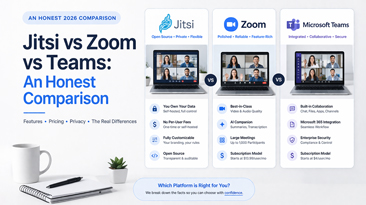
There's no single "best" platform — there's the best platform for your specific situation. Zoom wins on quality and convenience. Teams wins on Microsoft ecosystem integration. Jitsi wins on cost, privacy, and customization.
The real question is what you value most. If the answer is "I want to own my platform and stop paying per-user fees forever," the open-source and white label route is hard to beat on pure economics. If the answer is "I need the easiest possible setup and I don't care about the long-term cost," Zoom is fine.
Just make sure you've seen the five-year cost comparison before you decide. The numbers might change your mind about what "convenient" really costs.