Video Conferencing One Time Purchase: Platforms You Can Buy & Own | 2026 Guide
Table of Contents
- Introduction: Why the One-Time Purchase Model Is Growing
- What "Owning" Video Conferencing Software Actually Means
- Video Conferencing Platforms You Can Buy Outright
- Ownership Models Compared: Source Code vs. Perpetual License vs. Open Source
- Total Cost of Ownership: One-Time Purchase vs. Subscription
- The Hidden Costs of Ownership Nobody Warns You About
- Who Benefits Most from Buying Video Conferencing Outright
- Frequently Asked Questions
- Verdict: Should You Buy or Subscribe?
Introduction: Why the One-Time Purchase Model Is Growing
Every year, businesses spend more on software subscriptions. The average mid-size company now carries over 130 SaaS subscriptions, and the total spend keeps climbing because prices only move in one direction. Video conferencing sits near the top of that stack. Zoom raised prices in 2023 and again in 2025. Microsoft quietly increased Teams licensing costs through its Microsoft 365 bundle restructuring. Google followed a similar trajectory with Workspace.
Against that backdrop, a growing number of businesses are asking a different question: can I just buy video conferencing software once and be done with it?
The answer is yes. A small but legitimate market of video conferencing one time purchase options has emerged over the past few years. Some sell you the full source code. Others offer perpetual licenses. Others are open-source projects you can deploy for free. Each model gives you something subscriptions never will: a predictable, finite cost and genuine ownership of the tool your team uses every day.
This guide walks through every realistic option for buying video conferencing outright, explains what ownership actually means in practice, and does the math on whether it makes financial sense for your situation.
What "Owning" Video Conferencing Software Actually Means
Before comparing platforms, it is worth being precise about what "ownership" means in this context. The word gets used loosely by vendors, and the differences matter.
Source Code Ownership
This is the strongest form of ownership. You receive the complete, unobfuscated source code for the platform. You can modify it, extend it, rebrand it, host it wherever you want, and you are not dependent on the vendor for anything after the purchase. If the vendor disappears tomorrow, your software keeps running.
Perpetual License
You receive a license to use the software indefinitely, but you do not get the source code (or you get it with restrictions). The software works forever, but you may depend on the vendor for updates, bug fixes, and compatibility patches. Think of it like buying a car: you own the vehicle, but you do not own the factory blueprints.
Open Source as "Free Purchase"
Open-source video conferencing platforms like Jitsi Meet and BigBlueButton are free to download, deploy, and use. You effectively "purchase" them for zero dollars. You get the source code, the right to modify it, and full control. The trade-off is that nobody is packaging it up for you with support, documentation, or a polished deployment process. You are the vendor, the sysadmin, and the support team.
Lifetime License (Subscription Variant)
Some platforms advertise "lifetime deals" that are really just heavily discounted prepaid subscriptions. You pay once, but the software runs on the vendor's cloud. If they shut down or change terms, your access disappears. This is the weakest form of ownership and should be evaluated with skepticism.
Video Conferencing Platforms You Can Buy Outright
Here are the platforms that genuinely offer a one-time purchase model, ranked by the completeness of ownership you receive.
1. WhiteLabelZoom --- Full Source Code Ownership
WhiteLabelZoom sells a complete, production-ready video conferencing platform as a one-time purchase. You get the full source code, deploy on your own infrastructure, and brand it as your own. There are no per-user fees, no recurring license costs, and no dependency on the vendor's servers.
- Purchase model: One-time payment, full source code transfer
- Starting price: $2,499
- What you get: Complete platform with HD video, screen sharing, recording, chat, breakout rooms, waiting rooms, virtual backgrounds, end-to-end encryption option, admin dashboard
- Participants: Up to 500 per room
- Branding: Full white-label --- your logo, colors, domain, and custom UI
- Ongoing costs: Server hosting only ($20-80/month depending on scale)
- Updates: Included for 12 months; optional renewal for continued updates
- Best for: Businesses that want total control, full branding, and the strongest form of ownership available
The key differentiator is that you receive actual source code, not a compiled binary or a hosted instance. You can audit it, modify it, integrate it with your existing systems, and run it independently of any third party.
2. JupiterMeet Pro (CodeCanyon) --- Source Code with Marketplace Model
JupiterMeet Pro is sold through Envato's CodeCanyon marketplace. It is a WebRTC-based video conferencing solution built on Odin (or similar frameworks) and sold as a downloadable package with source code.
- Purchase model: One-time purchase through CodeCanyon
- Price: Approximately $59-79 (Regular License)
- What you get: Source code for a basic video conferencing application
- Participants: Varies by server capacity, typically 10-30 per room for the base product
- Branding: Customizable (you have the source code)
- Ongoing costs: Server hosting ($10-40/month)
- Updates: Typically 6-12 months included; extended support available for an additional fee
- Best for: Developers or small teams on a tight budget who are comfortable working with raw source code and handling deployment themselves
The price is dramatically lower, but so is the scope. CodeCanyon scripts are generally starting points rather than production-ready platforms. Expect to invest developer time in hardening, scaling, and customizing.
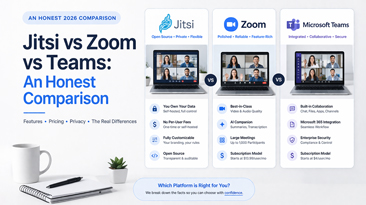
3. Jitsi Meet --- Open Source, Self-Hosted
Jitsi Meet is the most widely deployed open-source video conferencing platform. It is completely free to use, and the source code is available on GitHub. You can host it on your own servers and customize it extensively.
- Purchase model: Free (open source, Apache 2.0 license)
- Price: $0
- What you get: Full source code for a mature video conferencing platform
- Participants: Up to 75-100 per room (practical limit; performance degrades beyond this)
- Branding: Fully customizable with development effort
- Ongoing costs: Server hosting ($20-100/month), plus the value of your time maintaining it
- Updates: Community-driven; you pull updates from the repository
- Best for: Technical teams who have the expertise to deploy, configure, and maintain a self-hosted solution and do not need commercial support
Jitsi is genuinely excellent software. The caveat is that deploying it in a production-ready, branded, reliable configuration requires meaningful technical investment. The "free" price tag does not account for the 20-60 hours of setup and the ongoing maintenance burden.
4. BigBlueButton --- Open Source, Education-Focused
BigBlueButton is an open-source video conferencing platform designed primarily for education. It includes features like a shared whiteboard, breakout rooms, polling, and recording.
- Purchase model: Free (open source, LGPL license)
- Price: $0
- What you get: Full source code for an education-focused conferencing platform
- Participants: Up to 100-150 per room
- Branding: Customizable with development effort
- Ongoing costs: Server hosting ($40-150/month; BigBlueButton is more resource-intensive than Jitsi)
- Updates: Community-driven
- Best for: Schools, universities, and training organizations with in-house IT capability
5. MirrorFly --- Perpetual License Option
MirrorFly offers a self-hosted video and chat SDK with a perpetual licensing option. Rather than a complete platform, it provides the building blocks to create your own video conferencing experience.
- Purchase model: Perpetual license (one-time fee for the SDK)
- Price: Custom pricing, typically $5,000+
- What you get: SDK and APIs for video, voice, and chat; some source code access depending on the license tier
- Participants: Configurable based on infrastructure
- Branding: Full customization (it is an SDK, so you build the UI)
- Ongoing costs: Server hosting plus significant development cost to build your application layer
- Best for: Companies with a development team that wants to embed video conferencing into an existing product rather than deploy a standalone platform
Ownership Models Compared: Source Code vs. Perpetual License vs. Open Source
| Factor | Source Code Purchase | Perpetual License | Open Source | SaaS Subscription |
|---|---|---|---|---|
| You own the code | Yes | Partial or no | Yes | No |
| Vendor dependency | None after purchase | Moderate (updates, patches) | None | Total |
| Customization freedom | Unlimited | Limited to what the license allows | Unlimited | Near zero |
| Upfront cost | $2,000-5,000 | $3,000-10,000+ | $0 | $0 |
| Recurring cost | Hosting only | Hosting + optional support renewals | Hosting + your time | Per-user monthly fees |
| Risk if vendor shuts down | Zero impact | May lose updates/support | Zero impact | Lose everything |
| Time to production | 1-2 days (managed) | Weeks to months | Weeks to months | Minutes |
| Support included | Typically 12 months | Varies | Community only | Included |
The practical takeaway: source code ownership gives you the most control with the least long-term risk. Open source gives you similar control at zero upfront cost, but demands significantly more technical investment. Perpetual licenses sit in an uncomfortable middle ground where you pay a premium but may still depend on the vendor for critical updates.
Total Cost of Ownership: One-Time Purchase vs. Subscription
Numbers clarify things. Here is a 5-year TCO comparison for a 25-person team.
Scenario: 25-Person Team, 5-Year Window
| Cost Component | Zoom Business | WhiteLabelZoom | Jitsi (Self-Hosted) |
|---|---|---|---|
| Year 1 license/purchase | $4,950 ($16.49/user/mo) | $2,499 (one-time) | $0 |
| Year 1 hosting | Included | $960 ($80/mo) | $1,200 ($100/mo) |
| Year 1 setup/deployment | $0 | $0 (managed deployment included) | $3,000 (estimated 40hrs @ $75/hr) |
| Year 1 total | $4,950 | $3,459 | $4,200 |
| Year 2 total | $4,950 | $960 (hosting only) | $2,400 (hosting + ~16hrs maintenance) |
| Year 3 total | $5,200 (price increase) | $960 | $2,400 |
| Year 4 total | $5,200 | $960 | $2,400 |
| Year 5 total | $5,450 (price increase) | $960 | $2,400 |
| 5-Year Total | $25,750 | $7,299 | $13,800 |
| 5-Year Savings vs. Zoom | --- | $18,451 (72%) | $11,950 (46%) |
The one-time purchase model breaks even against Zoom by month 9. By year 5, the cumulative savings are substantial enough to fund other business priorities. Even the "free" open-source option costs more than the one-time purchase over 5 years, because the ongoing maintenance and higher hosting costs (Jitsi requires more hands-on server management) add up.
Worth noting: this analysis uses conservative Zoom pricing. If your team grows, the gap widens further. Adding 10 more users to Zoom costs another $1,980/year. Adding 10 more users to a one-time purchase platform costs nothing --- you already own it.
The Hidden Costs of Ownership Nobody Warns You About
Buying software outright is not the same as buying a coffee table. There are real ongoing costs, and anyone selling you a "one-time purchase" product without mentioning them is being dishonest. Here is what to budget for.
Server Hosting
Every self-hosted video conferencing platform needs servers. Video is bandwidth-intensive and CPU-intensive. For a 25-person team with moderate usage (10-20 concurrent users at peak), expect to spend $40-100/month on a capable VPS or cloud instance. For larger deployments, costs scale with concurrent user capacity.
SSL Certificates and Domain
You need a domain name ($10-15/year) and an SSL certificate (free via Let's Encrypt, or $50-200/year for a commercial certificate). Minor costs, but they exist.
Server Maintenance
Someone needs to apply operating system updates, monitor uptime, restart services after outages, and manage backups. If you have an IT person on staff, this is a marginal addition to their workload. If you do not, you will either learn basic server administration or pay someone $50-150/month for managed hosting support.
Security Patches
Video conferencing software interacts with browsers, WebRTC libraries, and media servers that are constantly being updated. A responsible deployment means applying security patches promptly. Vendors like WhiteLabelZoom include updates for 12 months and offer update packages beyond that. Open-source projects rely on community patches that you pull and apply yourself.
TURN/STUN Server Costs
WebRTC-based video conferencing uses TURN and STUN servers to handle connections when users are behind firewalls or NATs. Many deployments include a TURN server on the same machine as the main application, which works for smaller deployments. At scale, a dedicated TURN server adds $20-50/month.
The Cost of Not Updating
This is the hidden cost people forget. If you buy software and never update it, browser changes, security vulnerabilities, and WebRTC protocol updates will eventually break it. Ownership means responsibility. Budget for updates, whether through a vendor support renewal or your own development time.
Who Benefits Most from Buying Video Conferencing Outright
The one-time purchase model is not ideal for everyone. Here is where it makes the most financial and operational sense.
Agencies and Consultancies
If you run a marketing agency, design studio, or consulting firm, you hold video meetings constantly but your needs are straightforward: reliable video, screen sharing, and a professional appearance. A branded, one-time purchase platform pays for itself within a year and gives clients the impression of a larger, more established operation.
Healthcare Providers
Telehealth providers need HIPAA-compliant video conferencing with full data control. Owning the platform and hosting it on HIPAA-compliant infrastructure is often simpler and cheaper than navigating the compliance requirements of third-party SaaS platforms and signing BAAs that limit your liability exposure.
Education and Training Companies
Online tutoring services, corporate training providers, and educational institutions benefit from white-labeled, owned platforms. The one-time purchase removes per-student or per-trainer licensing costs that make scaling painful.
Startups Embedding Video in Their Product
If your product includes a video feature --- telehealth apps, online coaching platforms, virtual event tools --- building on a purchased platform with full source code is dramatically faster and cheaper than building from scratch or paying per-minute API fees.
Companies in Regulated Industries
Finance, legal, government, and defense organizations often have data sovereignty requirements that make SaaS subscriptions problematic. Owning and self-hosting the platform gives them complete control over where data resides and how it is processed.
Teams Over 20 People
The math on per-user SaaS pricing gets progressively worse as team size grows. A 50-person team on Zoom Business pays nearly $10,000/year. A one-time purchase at $2,499 with $960/year in hosting costs is less than one quarter of that.
Frequently Asked Questions
1. Is video conferencing one time purchase software as reliable as Zoom or Teams?
Reliability depends on your hosting infrastructure, not on whether you paid monthly or once. A one-time purchase platform deployed on a quality cloud provider (AWS, DigitalOcean, Hetzner) with proper configuration will deliver the same call quality as any SaaS platform. The underlying technology --- WebRTC --- is identical.
2. What happens when I need updates or new features?
Most one-time purchase vendors include 12 months of updates. After that, you can typically purchase an update extension (often 30-50% of the original price) or continue using your current version indefinitely. Open-source projects provide updates through their community repositories.
3. Can I really host video conferencing on a $20/month server?
For small teams (under 10 concurrent users), yes. Video conferencing is CPU-intensive during encoding and decoding, so the server needs adequate processing power. A 4-core VPS with 8GB RAM handles small deployments well. Larger teams or heavier usage will require more powerful infrastructure.
4. Do one-time purchase platforms include recording and cloud storage?
Recording is typically included in the software, but storage is your responsibility. Recordings are saved to your server's disk or to an object storage service like AWS S3. You control retention policies and access. This is actually an advantage --- you are not paying the vendor $10/month for 5GB of cloud storage.
5. What if the vendor goes out of business after I purchase?
This is where source code ownership matters. If you have the full source code, the vendor's fate is irrelevant. Your software runs independently on your servers. If you only have a perpetual license without source code, you may be stuck with whatever version you last received.
6. Is a CodeCanyon video conferencing script production-ready?
Generally, no. CodeCanyon scripts are starting points. They work as demos and prototypes, but deploying one for a business that relies on video conferencing daily will require additional development work for security hardening, performance optimization, UI polish, and scaling. Budget $2,000-5,000 in developer time on top of the purchase price for a production-ready deployment.
7. Can I use a one-time purchase platform for large webinars or events?
It depends on the platform. WhiteLabelZoom supports up to 500 participants per room, which covers most webinar use cases. For events exceeding that, you would need to configure additional media server capacity or consider a dedicated event streaming architecture. Open-source options like BigBlueButton can scale similarly with the right infrastructure.
8. How does a one-time purchase compare to using Zoom's free tier?
Zoom's free tier limits group meetings to 40 minutes, caps participants at 100, offers no recording, no branding, and no data control. It works for casual use but is impractical for any business that runs meetings regularly. A one-time purchase platform has no time limits, no participant caps (beyond server capacity), full recording, full branding, and complete data ownership.
Verdict: Should You Buy or Subscribe?
The video conferencing one time purchase model is not a gimmick. It is a legitimate alternative to subscription pricing that makes financial sense for a specific and growing segment of businesses.
Buy outright if:
- Your team has more than 10 people (the savings compound fast)
- You plan to use video conferencing for 2+ years (you will almost certainly break even)
- You need branding or white-labeling (subscriptions rarely offer this)
- You have data privacy, compliance, or sovereignty requirements
- You are embedding video conferencing into a product you sell
Stick with a subscription if:
- Your team is under 5 people and a free tier meets your needs
- You have zero technical resources and cannot manage a server
- You need deep integrations with Microsoft 365 or Google Workspace that only native platforms provide
- Your usage is temporary or project-based
For the majority of businesses between 10 and 500 employees that use video conferencing daily, the one-time purchase model saves significant money, provides stronger data control, and eliminates the slow bleed of per-user monthly fees. The only question is which ownership model --- source code, perpetual license, or open source --- fits your team's technical capacity and budget.
If you want the simplest path to ownership with the least technical friction, a source-code purchase from a vendor like WhiteLabelZoom gives you a production-ready platform within 48 hours, full branding, and the peace of mind that comes from knowing your video infrastructure belongs to you. Not rented. Not licensed. Owned.