7 Zoom Alternatives That Don't Require a Subscription | 2026 Guide
Table of Contents
- Why People Want Subscription-Free Video Conferencing
- What "No Subscription" Actually Means
- 7 Zoom Alternatives That Don't Require a Subscription
- Side-by-Side Comparison Table
- Cost Analysis: 3-Year Total Spend
- Feature Trade-Offs: Free vs. Paid One-Time
- Frequently Asked Questions
- The Verdict
Why People Want Subscription-Free Video Conferencing
Zoom changed the way the world communicates. It also normalized the idea that video conferencing should cost $13 to $22 per user per month, forever. For a 15-person team, that works out to $2,340 to $3,960 per year. Over five years, the number crosses $10,000 and keeps climbing, because SaaS providers rarely lower their prices.
The search for a zoom alternative no subscription has grown steadily since 2023 for a straightforward reason: people have done the math. Monthly fees made sense when video conferencing was novel and the infrastructure to deliver it was expensive. In 2026, the underlying technology --- WebRTC, open-source media servers, commoditized cloud compute --- has matured to the point where subscription pricing is less about covering costs and more about maximizing recurring revenue.
That does not mean every subscription-free option is a perfect replacement. Some free tools impose hard limits on meeting duration or participant counts. Some open-source platforms require technical skill to deploy. And some one-time purchase solutions deliver the full feature set without the ongoing invoice. The right choice depends on what you actually need.
This guide walks through seven legitimate alternatives, lays out exactly what each one costs (or does not cost), and helps you decide which model fits your situation.
What "No Subscription" Actually Means
Before we compare options, it is worth clarifying the three distinct models that all qualify as "no subscription."
Completely Free
Some platforms offer a free tier or are entirely free to use. The trade-off is usually feature limitations, participant caps, or the fact that you are using someone else's infrastructure with limited control over branding and data.
Open Source (Self-Hosted)
Open-source video conferencing software is free to download and run. You pay for the server to host it and the labor to maintain it. There are no per-user licensing fees, but there is an operational cost that scales with your technical capability.
One-Time Purchase
A newer model where you pay a single upfront fee for a fully featured video conferencing platform. No monthly invoices, no per-user charges, no renewal surprises. You own the software and run it on your infrastructure or the vendor's.
Each of these models eliminates recurring subscription fees. They differ significantly in total cost of ownership, feature depth, and the amount of effort required from you.
7 Zoom Alternatives That Don't Require a Subscription
1. WhiteLabelZoom --- One-Time Purchase, Full Feature Set
WhiteLabelZoom is a white-label video conferencing platform sold as a one-time purchase. You pay once and get a production-ready video conferencing solution that you can brand as your own, deploy on your infrastructure, and run without ever paying a recurring license fee.
Pricing model: One-time purchase starting at $499. Participant limit: Up to 500 per meeting (infrastructure dependent). Meeting duration: Unlimited. Key features: HD video and audio, screen sharing, recording, breakout rooms, waiting rooms, virtual backgrounds, custom branding, chat, file sharing, webinar mode, API access. Best for: Businesses, agencies, and educators who want a fully branded, feature-complete platform without ongoing fees.
The core advantage is that WhiteLabelZoom delivers Zoom-level functionality --- breakout rooms, recording, webinars, custom branding --- without tying you to a monthly payment. You get the source code, which means you can modify, extend, and integrate it however you need.
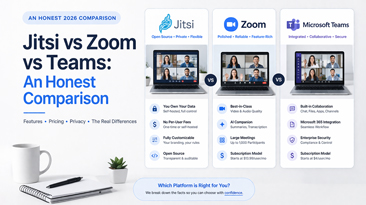
2. Jitsi Meet --- Free and Open Source
Jitsi Meet is the most widely used open-source video conferencing platform. The public instance at meet.jit.si is completely free with no account required. For more control, you can self-host on your own server.
Pricing model: Free (public instance) or self-hosted (server costs only). Participant limit: ~75 on public instance, higher when self-hosted with proper infrastructure. Meeting duration: Unlimited. Key features: Video/audio calls, screen sharing, chat, recording (self-hosted), end-to-end encryption, no account needed. Best for: Individuals, small teams, and developers comfortable with Linux server administration.
Jitsi is an excellent zero-cost starting point. The trade-off is that the public instance offers no branding, no recording by default, and no admin controls. Self-hosting unlocks those capabilities but requires you to provision, configure, and maintain a server. Budget $20 to $80 per month for a VPS capable of handling 20-50 concurrent users, plus the time to manage it.
3. BigBlueButton --- Free and Open Source (Education-Focused)
BigBlueButton was designed specifically for online learning. It is open source, free to use, and includes features like a shared whiteboard, breakout rooms, and polling that make it popular with schools and training organizations.
Pricing model: Free (self-hosted, server costs only). Participant limit: Up to 150 per session (infrastructure dependent). Meeting duration: Unlimited. Key features: Whiteboard, breakout rooms, polling, shared notes, recording, closed captions, LMS integration (Moodle, Canvas). Best for: Educational institutions, training companies, and tutors who need classroom-oriented features.
The limitation is operational complexity. BigBlueButton has specific server requirements (Ubuntu 20.04 or 22.04, dedicated hardware recommended) and the installation process is more involved than Jitsi. If you are not comfortable with server administration, you will need to hire someone or use a managed hosting provider, which introduces a recurring cost of its own.
4. Google Meet (Free Tier) --- No Download, Limited Features
Google Meet offers a free tier for anyone with a Google account. It is the path of least resistance: open a browser, start a call, share the link. No software to install, no server to manage.
Pricing model: Free tier (paid Workspace plans also available). Participant limit: 100. Meeting duration: 60 minutes (1-on-1 calls are unlimited). Key features: Video/audio calls, screen sharing, real-time captions, noise cancellation, chat. Best for: Casual users, freelancers, and small teams already in the Google ecosystem who can work within the 60-minute limit.
The free tier is genuinely useful for short meetings. The hard 60-minute cap on group calls is the dealbreaker for many teams. There is no recording, no breakout rooms, and no custom branding on the free plan. You are also sending all meeting data through Google's infrastructure, which may be a concern for privacy-conscious organizations.
5. Skype --- Free, Legacy Platform
Skype has been free for consumer use since its inception. Microsoft has kept it alive even after pushing Teams as its primary business tool. For basic video calling, it still works.
Pricing model: Free. Participant limit: 100. Meeting duration: 24 hours (effectively unlimited). Key features: Video/audio calls, screen sharing, chat, file sharing, call recording, real-time translation. Best for: Individuals and small groups who need basic, reliable video calls and do not mind using a legacy platform.
Skype's future is perpetually uncertain. Microsoft has shifted investment to Teams, and feature development on Skype has slowed significantly. It remains functional for casual use, but building a business workflow around a platform with an unclear roadmap carries risk.
6. FaceTime --- Free, Apple Ecosystem Only
FaceTime is free for anyone with an Apple device. Since 2021, Apple has allowed FaceTime links to be shared with Android and Windows users via browser, though the experience for non-Apple participants is notably limited.
Pricing model: Free (requires Apple devices for full functionality). Participant limit: 32. Meeting duration: Unlimited. Key features: Video/audio calls, screen sharing (Apple devices), SharePlay, spatial audio, portrait mode. Best for: Teams and groups where everyone (or nearly everyone) uses Apple hardware.
The Apple-only constraint is the obvious limitation. The 32-participant cap makes it unsuitable for larger meetings or webinars. There is no recording, no breakout rooms, no admin controls, and no branding. FaceTime is a consumer communication tool, not a business platform.
7. Whereby (Free Tier) --- Browser-Based Simplicity
Whereby offers a free plan that lets you create one personal meeting room accessible via a permanent link. No downloads required for any participant. The interface is clean and simple.
Pricing model: Free tier (paid plans also available). Participant limit: 100 (free tier). Meeting duration: 45 minutes (free tier). Key features: Video/audio calls, screen sharing, chat, reactions, virtual backgrounds. Best for: Freelancers, consultants, and solopreneurs who want a simple, always-available meeting link for client calls.
The free tier is limited to one room and 45-minute group calls. No recording, no breakout rooms, and no branding unless you upgrade to a paid plan --- which reintroduces the subscription you were trying to avoid.
Side-by-Side Comparison Table
| Feature | WhiteLabelZoom | Jitsi Meet | BigBlueButton | Google Meet (Free) | Skype | FaceTime | Whereby (Free) |
|---|---|---|---|---|---|---|---|
| Cost model | One-time purchase | Free / self-host | Free / self-host | Free tier | Free | Free | Free tier |
| Upfront cost | From $499 | $0 | $0 | $0 | $0 | $0 | $0 |
| Recurring cost | Hosting only | Hosting (self-hosted) | Hosting (self-hosted) | $0 | $0 | $0 | $0 |
| Max participants | 500 | ~75 (public) | 150 | 100 | 100 | 32 | 100 |
| Meeting duration | Unlimited | Unlimited | Unlimited | 60 min | 24 hrs | Unlimited | 45 min |
| Recording | Yes | Self-hosted only | Yes | No | Yes | No | No |
| Breakout rooms | Yes | Yes | Yes | No | No | No | No |
| Custom branding | Yes | Self-hosted only | Self-hosted only | No | No | No | No |
| Screen sharing | Yes | Yes | Yes | Yes | Yes | Apple only | Yes |
| Webinar mode | Yes | No | No | No | No | No | No |
| API access | Yes | Yes | Yes | Limited | No | No | Paid only |
| No account needed | Configurable | Yes | Yes | No | No | No | Yes (guests) |
| Self-hosted option | Yes | Yes | Yes | No | No | No | No |
Cost Analysis: 3-Year Total Spend
Here is what each option actually costs over three years for a team of 15 people, including hidden costs that the marketing pages do not mention.
Zoom Pro (for reference)
- Per-user cost: $13.33/month
- Annual cost (15 users): $2,399
- 3-year total: $7,197
- Notes: Price increases likely at renewal. Locked into Zoom's ecosystem.
WhiteLabelZoom
- One-time license: $499-$997
- Hosting (VPS or cloud): ~$40/month = $1,440 over 3 years
- 3-year total: $1,939-$2,437
- Notes: No per-user fees. Full feature set from day one. Hosting cost scales with usage, not users.
Jitsi Meet (Self-Hosted)
- Software license: $0
- Hosting: ~$40/month = $1,440 over 3 years
- Setup and maintenance labor: 10-20 hours/year at $50-100/hr = $1,500-$6,000 over 3 years
- 3-year total: $2,940-$7,440
- Notes: The "free" option can cost more than the paid one-time option when you factor in labor. If you have in-house expertise, the labor cost drops significantly.
BigBlueButton (Self-Hosted)
- Software license: $0
- Hosting (higher requirements): ~$60/month = $2,160 over 3 years
- Setup and maintenance labor: 15-30 hours/year at $50-100/hr = $2,250-$9,000 over 3 years
- 3-year total: $4,410-$11,160
- Notes: BBB has heavier server requirements than Jitsi. Maintenance is more time-intensive due to the platform's complexity.
Google Meet (Free Tier)
- Software cost: $0
- 3-year total: $0
- Notes: Genuinely free --- if you can live with 60-minute group calls, no recording, no branding, and no admin controls. For many businesses, these limitations push them to Google Workspace ($7.20/user/month), which reintroduces the subscription at $3,888 over 3 years.
Skype
- Software cost: $0
- 3-year total: $0
- Notes: Free and functional, but aging. Feature development has stalled. Not suitable for client-facing meetings or branded experiences.
FaceTime
- Software cost: $0
- 3-year total: $0
- Notes: Only viable if your entire team and all external participants use Apple devices. The 32-person cap and lack of business features make it impractical for most professional use cases.
Whereby (Free Tier)
- Software cost: $0
- 3-year total: $0
- Notes: One room, 45-minute limit, no recording. Most teams outgrow the free tier quickly, leading to the $8.99/user/month Pro plan ($4,853 over 3 years for 15 users).
The takeaway: Free is genuinely free only if your needs are minimal. The moment you need recording, branding, longer meetings, or more control, you are either paying for a subscription or investing in a one-time solution. WhiteLabelZoom sits in the middle ground --- more capable than any free tier, less expensive over time than any subscription or self-hosted open-source option when labor is factored in.
Feature Trade-Offs: Free vs. Paid One-Time
Choosing between free and one-time-purchase comes down to what you are willing to accept and what you cannot do without.
What Free Tiers Give You
- Basic video and audio calling
- Screen sharing
- Chat during meetings
- No upfront investment
- Instant setup (minutes, not hours)
What Free Tiers Take Away
- Recording: Almost no free tier includes meeting recording. If you need to archive meetings for compliance, training, or reference, free options leave you stuck.
- Branding: Free tools display the vendor's logo, domain, and interface. For client-facing calls, this signals "we use someone else's free tool" rather than "we have our own platform."
- Duration and participants: Hard caps on meeting length (45-60 minutes) and participant counts (32-100) constrain how you can use the tool.
- Admin controls: No user management, no meeting policies, no usage analytics.
- Data ownership: Your meeting data lives on someone else's servers, governed by their privacy policy.
What a One-Time Purchase Adds
- Full feature parity with subscription tools: Recording, breakout rooms, webinars, waiting rooms, virtual backgrounds --- the features you would get from Zoom Pro or Business, without the monthly fee.
- Custom branding: Your logo, your colors, your domain. Every meeting looks like your product.
- Data control: Self-hosted deployment means your meeting data stays on your infrastructure.
- No artificial limits: No 45-minute cutoffs, no 100-participant ceilings. Limits are set by your infrastructure, not by a pricing tier designed to push you to the next plan.
- Source code access: Modify, extend, and integrate the platform to fit your specific workflow.
The Honest Assessment
If you hold fewer than five meetings per week, each under 45 minutes, with fewer than 10 people, and you do not need recording or branding, a free tier is likely sufficient. Google Meet or Whereby will serve you adequately at zero cost.
If you need recording, custom branding, longer meetings, larger groups, or data control, the free tier model breaks down. At that point, your real choice is between a monthly subscription that compounds forever and a one-time purchase that pays for itself within 6 to 12 months.
Frequently Asked Questions
1. Is there a truly free alternative to Zoom with no catch?
Jitsi Meet's public instance (meet.jit.si) is the closest thing to a no-catch free Zoom alternative. It requires no account, has no time limits, and supports up to 75 participants. The trade-off is that you get no recording, no branding, and no admin controls. For casual use, it is excellent. For business use, you will eventually want more.
2. Can I use Google Meet for free without a Google Workspace subscription?
Yes. Anyone with a free Google account can start or join Google Meet calls. Group calls are limited to 60 minutes and 100 participants. You do not get recording, breakout rooms, or noise cancellation on the free tier. One-on-one calls have no time limit.
3. What is the cheapest way to replace Zoom for a small business?
For a team of 10-20 people, a one-time purchase platform like WhiteLabelZoom offers the lowest total cost of ownership over two or more years. The upfront cost is higher than free, but the three-year total is typically 50-70% less than a Zoom subscription and comparable to or less than self-hosting an open-source tool when you factor in labor.
4. Is Jitsi Meet reliable enough for business use?
The self-hosted version of Jitsi is used by thousands of organizations worldwide and is reliable when properly configured on adequate hardware. The public instance at meet.jit.si is best treated as a convenience tool rather than a business-critical platform, since you have no control over uptime, capacity, or configuration.
5. Can FaceTime replace Zoom for a remote team?
Only if every team member and every external participant you meet with uses an Apple device. FaceTime supports up to 32 participants and has no time limit, but it lacks recording, breakout rooms, screen sharing for non-Apple users, and any form of admin control. For Apple-only teams with simple needs, it works. For most businesses, the platform constraint is disqualifying.
6. Does Skype still work for video conferencing in 2026?
Skype remains functional for basic video calls with up to 100 participants. Microsoft continues to maintain it, but feature development has largely moved to Teams. Skype is a reasonable choice for informal calls. It is not a platform most businesses should build critical workflows around, given the uncertain product roadmap.
7. What is the difference between open-source and one-time purchase video conferencing?
Open-source platforms (Jitsi, BigBlueButton) provide free software that you host and maintain yourself. A one-time purchase platform (WhiteLabelZoom) provides a complete, production-ready solution that includes the software, support, and documentation needed to deploy without extensive technical expertise. The one-time purchase saves significant labor compared to configuring open-source tools from scratch.
8. How long does it take to set up a subscription-free video conferencing platform?
It depends on the option. Google Meet or Skype: minutes. Jitsi Meet self-hosted: 2-8 hours for initial setup, ongoing maintenance required. BigBlueButton self-hosted: 4-16 hours for initial setup. WhiteLabelZoom: 2-4 hours for a branded deployment, with documentation guiding each step.
The Verdict
The zoom alternative no subscription landscape in 2026 breaks down into three clear tiers.
Best for zero budget, minimal needs: Jitsi Meet (public instance) or Google Meet free tier. You get basic video calls with real limitations. Suitable for freelancers, solopreneurs, and casual use.
Best for technical teams willing to self-host: Jitsi Meet or BigBlueButton, self-hosted. You trade labor for flexibility and control. The total cost is not zero --- server fees and maintenance hours add up --- but you avoid per-user licensing entirely.
Best overall value for businesses: WhiteLabelZoom. A one-time purchase eliminates both the recurring subscription and the ongoing labor cost of maintaining open-source infrastructure. You get the feature set of a premium subscription tool --- recording, branding, breakout rooms, webinars, API access --- without the monthly invoice. Over three years, it costs less than Zoom Pro and delivers more than any free tier.
The question is not whether subscription-free video conferencing is viable. It is. The question is how much capability you need and how much effort you are willing to invest. For most businesses that have outgrown free tiers but resent paying monthly fees, a one-time purchase strikes the right balance between cost, features, and operational simplicity.
Stop paying rent on software you could own.